Cisco CSR1000v in AWS: IPSec tunnel configuration

Using IKEv1 w/ IPSec tunnels, the PSK address and tunnel destination should be the public IP of the remote side, even if the other router is behind NAT using Elastic IP:

crypto isakmp key XXXXXXXX address PUBLIC.IP.OF.REMOTE
crypto isakmp invalid-spi-recovery
crypto isakmp keepalive 10 10
!
crypto ipsec security-association replay window-size 1024
!
crypto ipsec transform-set ESP_AES128_SHA esp-aes esp-sha-hmac 
 mode tunnel
!
crypto ipsec profile ESP_3600_PFS-G2
 set security-association lifetime kilobytes disable
 set transform-set ESP_AES128_SHA  
 set pfs group2
!
interface Tunnel1
 ip address 169.254.1.1 255.255.255.252
 keepalive 10 3
 tunnel source GigabitEthernet1
 tunnel mode ipsec ipv4
 tunnel destination PUBLIC.IP.OF.REMOTE
 tunnel protection ipsec profile ESP_3600_PFS-G2
!
interface GigabitEthernet1
 ip address 10.10.10.10 255.255.255.0
 ip nat outside
 negotiation auto
 no mop enabled
 no mop sysid
!
ip route 0.0.0.0 0.0.0.0 10.10.10.1

I was surprised this worked.  Why?  Because the tunnel source is GigabitEthernet1’s private IP address of 10.10.10.10.  I would expect the other side to reject the proposal because it doesn’t match the public IP address with the isakmp key configured.

But looking closer, it’s actually  using NAT-T (udp port 4500):

csr1000v-1#show crypto session 

Interface: Tunnel1
Session status: UP-ACTIVE
Peer: PUBLIC.IP.OF.REMOTE port 4500 
IPSEC FLOW: permit ip 0.0.0.0/0.0.0.0 0.0.0.0/0.0.0.0 
Active SAs: 2, origin: crypto map


Cisco AnyConnect Client squashing other VPN client routes when there is split tunnel overlap

Consider a VPN client such as Palo Alto GlobalProtect doing split tunneling with an include access route of 10.4.0.0/16, 10.5.0.0/16, and 10.6.0.0/16.  The client route table in Windows looks like this, as expected:

C:\Users\harold>route print

IPv4 Route Table
=======================================================================
Active Routes:
Network Destination Netmask Gateway Interface Metric
10.4.0.0 255.255.0.0 On-link 10.4.1.205 1
10.5.0.0 255.255.0.0 On-link 10.4.1.205 1
10.6.0.0 255.255.0.0 On-link 10.4.1.205 1

The user then connects to a AnyConnect VPN with a split tunnel include of 10.0.0.0/8.  Something rather funny happens!

C:\Users\harold>route print

IPv4 Route Table
=======================================================================
Active Routes:
Network Destination Netmask Gateway Interface Metric
10.4.0.0 255.255.0.0 On-link 10.4.1.205 1
10.4.0.0 255.255.0.0 10.8.2.1 10.8.2.27 2
10.5.0.0 255.255.0.0 On-link 10.4.1.205 1
10.5.0.0 255.255.0.0 10.8.2.1 10.8.2.27 2
10.6.0.0 255.255.0.0 On-link 10.4.1.205 1
10.6.0.0 255.255.0.0 10.8.2.1 10.8.2.27 2

AnyConnect has created duplicate routes…for routes that don’t even belong to it.  But since the metric is a higher value (2 vs. 1) these routes are ignored by Windows.  So, no harm no foul I guess?

Different story on Mac though…hmmm


sadf


Cisco ASA: Forcing local authentication for serial console

One of the root problems of administrative access to the ASA platform is there’s no easy way to bypass a broken AAA server

Cisco IOS has this:

aaa authentication enable default group radius none

But the ASA equivalent has no “none” option, so most people will configure this:

aaa authentication enable console RADIUS LOCAL

Now the problem here is if the user authenticates locally and the Radius server is still marked “up”, they’ll be forced to authenticate through it.  This creates two problematic scenarios

  1. The Radius server is reachable, but the username does not exist
  2. The Radius server is marked up but is actually unreachable, misconfigured, or horked in some way

The latter case occurred during our last two ASA outages.  It was especially frustrating because I had configured serial consoles to both ASAs, only to be unable to get to enable mode to force a reboot/failover and recover from the outage without having to drive to the data center.

A reddit user pointed me to this command:

aaa authorization exec LOCAL auto-enable

Which should in theory force accounts using local authentication to bypass the enable prompt assuming they’re set to priv 15.  But after having no luck with it and escalating through Cisco I discovered this command does not work with serial console logins.  So, I was back to square one.

The solution I settled on was to simply force local for both serial console authentication and enable mode:

aaa authentication serial console LOCAL
aaa authentication enable console LOCAL

Unfortunately the catch 22 revealed itself again, as this broke enable mode for Radius users, since they did not have local accounts.  So I added this line to try and bypass enable for Radius users:

aaa authentication ssh console RADIUS LOCAL
aaa authorization exec authentication-server auto-enable

Now I see them passing authentication on the Radius server, but the ASA rejecting them with this error:

%ASA-3-113021: Attempted console login failed user 'bob' did NOT have appropriate Admin Rights.

I had already configured priv-lvl=15 in the Radius server’s policy, so not sure what else it could need.  Turns out it also needed this attribute set:

Service-Type: Administrative

After this, now everything is happy.  SSH users get auto-enabled via RADIUS and can still fallback to local (in theory) if the server is down.  But if that’s broken, I can console in with a local username/password and enter enable mode.


Cisco 2702i Lightweight AP Factory Reset when Controller not available

Power on the AP while holding down the Mode button until the LED turns red, then release.  Wait for the “ap:” prompt.  Then do this:

ap: delete flash:capwap-saved-config
Are you sure you want to delete "flash:capwap-saved-config" (y/n)?y
File "flash:capwap-saved-config" deleted
ap: boot
Rebooting system to reset DPAA...

And for good measure

AP#delete flash:config.txt
Delete filename [config.txt]? 
Delete flash:/config.txt? [confirm]
AP#reload
Proceed with reload? [confirm]


Monitoring CPU & Memory in IOS-XE

ios-xe_cpu

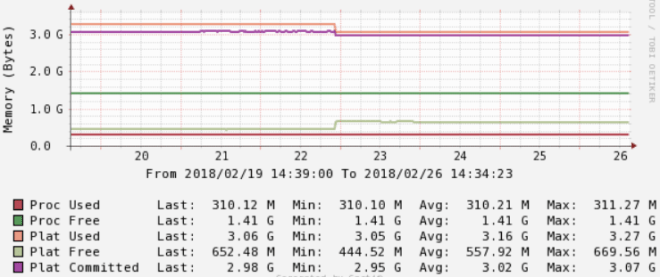
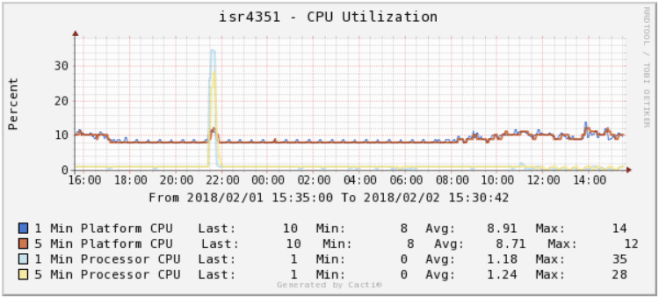
One important thing to understanding in IOS-XE is the different numbers that can be returned when checking CPU and memory statistics.  There’s some very down in the weeds docs on this, but the simplest way to break it down is process vs. platform.  Processes is essentially control plane, while platform is data plane.

CPU

Processor CPU

CLI command: show processes cpu

SNMP OIDs:

1.3.6.1.4.1.9.2.1.56.0 = 5 second
1.3.6.1.4.1.9.2.1.57.0 = 1 minute
1.3.6.1.4.1.9.2.1.58.0 = 5 minute

Platform CPU

CLI command: show processes cpu platform

SNMP OIDs:

1.3.6.1.4.1.9.9.109.1.1.1.1.3.7 = 5 second
1.3.6.1.4.1.9.9.109.1.1.1.1.4.7 = 1 minute
1.3.6.1.4.1.9.9.109.1.1.1.1.5.7 = 5 minute

Note – Most platforms will be multi-core.

Memory

Processor Memory

CLI command: show processes memory

SNMP OIDs:

1.3.6.1.4.1.9.9.48.1.1.1.5.1 = Memory Used
1.3.6.1.4.1.9.9.48.1.1.1.6.1 = Memory Free

Platform Memory

CLI command: show platform resources

SNMP OIDs:

1.3.6.1.4.1.9.9.109.1.1.1.1.12.7 = Memory Used
1.3.6.1.4.1.9.9.109.1.1.1.1.13.7 = Memory Free
1.3.6.1.4.1.9.9.109.1.1.1.1.27.7 = Memory Committed

Cacti Templates

These were written for Cacti 0.8.8f

https://spaces.hightail.com/space/FoUD1PvlXA


Cisco Serial Console w/ VRF

In this example an HWIC-16a is installed in a 2921 ISR G2 router’s slot 0/0.  The management port is configured to a VRF called “MGMT”.  The hostnames for the connected devices are set with the “ip host” line along with the VRF, port number (port 0 = tcp port 2003) and local router’s IP address.

hostname isr2921
interface Port-channel1.10
 encapsulation dot1Q 10
 ip vrf forwarding MGMT
 ip address 10.10.10.10 255.255.255.0
!
ip host vrf MGMT router1 2003 10.10.10.10
ip host vrf MGMT router2 2004 10.10.10.10
!
line 0/0/0 0/0/15
 session-timeout 30 
 exec-timeout 30 0
 transport input telnet ssh
!

To connect, specify the VRF name as a parameter

isr2921#telnet router1 /vrf MGMT
Translating "router1"
Trying router1 (10.10.10.10, 2003)...

Internal NICs on UCS E-Series Servers

General rules:

  1. The router’s ‘ucse1/0/0 + ucse1/0/1’ ports will map to GE0 and GE1 on the blade
  2. Bridging must be used to join the physical interfaces to the same broadcast domain
  3. Separate bridges must be used for each VLAN
  4. To use a native vlan, use “encapsulation untagged”

In our case we wanted to use tagging in the connection to the switch, but put the blade’s GE0 and GE1 interfaces on vlan 123 without tagging:

bridge-domain 123
!
interface Port-channel1
 no ip address
 no negotiation auto
 service instance 123 ethernet
 encapsulation dot1q 123
 rewrite ingress tag pop 1 symmetric
 snmp ifindex persist
 bridge-domain 123
 !
interface GigabitEthernet0/0/1
 description Switch:1
 no ip address
 negotiation auto
 channel-group 1 mode active
interface GigabitEthernet0/0/2
 description Switch:2
 no ip address
 negotiation auto
 channel-group 1 mode active
!
interface ucse1/0/0
 description UCS E-Series Blade:GE0
 no ip address
 no negotiation auto
 switchport mode trunk
 service instance 123 ethernet
 encapsulation untagged
 bridge-domain 123
 !
interface ucse1/0/1
 description UCS E-Series Blade:GE1
 no ip address
 no negotiation auto
 switchport mode trunk
 service instance 123 ethernet
 encapsulation untagged
 bridge-domain 123
 !