This is a setting you’ll want to make sure is checked on newer Cisco controllers in environments where clients may roam during voice/video sessions. Without it, some clients will drop 2-3 seconds with roaming between APs. It’s set at the WLAN level.
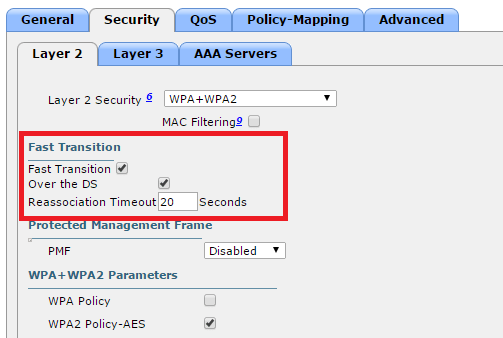
This is a setting you’ll want to make sure is checked on newer Cisco controllers in environments where clients may roam during voice/video sessions. Without it, some clients will drop 2-3 seconds with roaming between APs. It’s set at the WLAN level.
This is a very important non-default configuration setting to enable on Cisco Wireless Controllers hosting Mac clients. Without it, clients may fail to associate when changing to a different wifi network.
Find it in the GUI under Controller -> General.
iPad / iPhone SSID change issue
Pretty much anyone who’s worked with Cisco switches is familiar with the 3750 series and its sister series, the 3560. These switches started out as 100Mb some 15 years ago, went to Gigabit with the G series , 10 Gb with the E series, and finally 10 Gb SFPs and StackPower with the X series in 2010. In 2013, the 3560 and 3750 series rather abruptly went end of sale, in favor of the 3650 and 3850 series, respectively. Cisco did however continue to sell their lower-end cousin, the Layer 2 only 2960 series.
3560 & 3750s are deployed most commonly in campus and enterprise wiring closets, but it’s not uncommon to see them as top of rack switches in the data center. The 3750s are especially popular in this regard because they’re stackable. In addition to managing multiple switches via a single IP, they can connect to the core/distribution layer via aggregate uplinks, which saves cabling mess and port cost.
Unfortunately, I was reminded recently the 3750s come with a huge caveat: small buffer sizes. What’s really shocking is as Cisco added horsepower in terms of bps and pps with the E, and X series, they kept the buffer sizes exactly the same: 2MB per 24 ports. In comparison, a WS-X6748-GE-TX blade on a 6500 has 1.3 MB per port. That’s about 20x as much. When a 3750 is handling high bandwidth flows, you’ll almost always see output queue drops:
Switch#show mls qos int gi1/0/1 stat
  cos: outgoing
-------------------------------

  0 -  4 :  3599026173            0            0            0            0
  5 -  7 :           0            0      2867623
  output queues enqueued:
 queue:    threshold1   threshold2   threshold3
-----------------------------------------------
 queue 0:           0           0           0
 queue 1:  3599026173           0     2867623
 queue 2:           0           0           0
 queue 3:           0           0           0

  output queues dropped:
 queue:    threshold1   threshold2   threshold3
-----------------------------------------------
 queue 0:           0           0           0
 queue 1:    29864113           0         171
 queue 2:           0           0           0
 queue 3:           0           0           0
There is a partial workaround for this shortcoming: enabling QoS and tinkering with queue settings. When enabling QoS, the input queue goes 90/10 while the output queue goes 25/25/25/25. If the majority of traffic is CoS 0 (which is normal for a data center), the buffer settings for output queue #2 can be pushed way up.
mls qos queue-set output 1 threshold 2 3200 3200 50 3200
mls qos queue-set output 1 buffers 5 80 5 10
mls qos
Note here that queue-set 1 is the “default” set applied to all ports. If you want to do some experimentation first, modify queue-set 2 and apply this to a test port with the “queue-set 2” command. Also note that while the queues are called 1-2-3-4 in configuration mode, they’ll show up as 0-1-2-3 respectively in the show commands. So, clearly the team writing the configuration and writing the show output weren’t on the same page. That’s Cisco for you.
Bottom line: don’t expect more than 200 Mbps per port when deploying a 3560 or 3750 to a server farm. I’m able to work with them for now, but will probably have to look at something beefier long term. Since we have Nexus 5548s and 5672s at the distribution layer, migrating to the Nexus 2248 fabric extenders is the natural path here. I have worked with the 4948s in the past but was never a big fan due to the high cost and non-stackability. End of row 6500 has always been my ideal deployment scenario for a Data Center, but the reality is sysadmins love top of rack because they see it as “plug-n-play”, and ironically fall under the misconception that having a dedicated switch makes over-subscription less likely.
When doing major software upgrades on an ASA, I found that AnyConnect sessions will authenticate successfully but not initiate access. The error message on the client was “Login denied, unauthorized connection mechanism”. There were no logs on the server side.

You’d think the problem would be in the tunnel group policy, but it’s actually in the group policy, where ‘ssl-client’ must be included:
group-policy MyGroup attributes
 vpn-idle-timeout 120
 vpn-session-timeout none
 vpn-tunnel-protocol ikev2 ssl-client
Most mid-level Cisco network engineers are familiar with BPDU Guard and its sister BPDU Filter, both of which are designed to prevent loops on STP edge (portfast) ports and covered in CCNP certification. When configured in global mode, BPDU filter on a Catalyst 3650 switch will look like this:
spanning-tree mode rapid-pvst
spanning-tree portfast bpdufilter default
spanning-tree extend system-id
spanning-tree pathcost method long
If any port configured as a edge port receives a BPDU, it will automatically revert back to the standard 35-second Rapid Spanning-Tree cycle:
This is a good tool to have in campus environments where 99.99% of the connections are loop-free, but there’s always a chance a user will plug a switch in to multiple ports, either by accident or thinking it will “bond” the connections.
What most people miss is that bpdu filter can also be configured on a per-port level, but results in very different behavior. When applied the port level, the port will just always be in forwarding state. For all intents and purposes, spanning-tree is disabled on these ports. Whoa! You probably don’t want that!
Many peers do not believe me when I tell them this, but it can be easily tested in a lab. Just configure bpdufilter on two switch ports, plug in a crossover cable:
Notice both ports are in designated/forwarding state:
Now send a broadcast and watch the frames fly Ooof!
But yeah, let’s use Cisco ASAs for all our VPN tunnels. Great idea.
Tips:
By default, losing any interface in any context will disable the physical firewall from participating in the cluster. To change this, in system context:
cluster group MyClusterGroup
 no health-check monitor-interface Management0/0

“It was the worst network outage…I ever seen”
I got bit by probably the worst outage ever this weekend. Chain of events:
Ouch. Ouch. Ouch. Ouch.
While note the longest outage I’ve experienced, this probably has been the worst. There’s lots of things to go about fixing, namely DTP should be disabled on 3750s with “switchport mode access” for all access layer ports. But for the main culprit, it really looks like Cisco’s etherchannel misconfigation guard need some re-examination and should be used with extreme caution in mixed environments.
At a minimum, enable error recovery, so that if it does kick, it’s only temporary:
errdisable recovery cause channel-misconfig (STP)
And lower the interval from the default of 5 minutes to the shortest time possible:
errdisable recovery interval 30
If running LACP or PAgP for all aggregate links, it’s fine to disable the feature altogether:
no spanning-tree etherchannel guard misconfig
This is because should there be a mismatch, it will be removed from the bundle and set to independent mode, at which point Spanning-Tree will kick in and make all well until the configuration can be corrected.
By default the Cisco ASA has a TCP MSS size of 1380. On larger packets coming over a VPN tunnel, it won’t be able to process these. Microsoft RDP is the most common example although it can also be observed with protocols like FTP.
The quick fix is make this change on the ASA:
sysopt connection tcp-mss 1300
This will cause the packets to be fragmented, and pass successfully over the VPN and through the ASA.
Sources:
WS-X6148 & WS-X6548
WS-X6148A & WS-X6748
In short, the 6148 and 6548s should only be used in low-traffic environments, with SUP32 and SUP720 (non VSS) Supervisor cards. The 6148A and 6748 are for high-traffic environments, such as server farms
 Layer 77